Cat5e, Cat6, Cat6a, Cat7, and Cat8 are the various types of Ethernet cables, each designed for different speeds and requirements in wired networks. Cat5e is fine for the average home setup, delivering up to 1 Gbps on short runs. Cat6 and Cat6a step things up, providing quicker data rates and reduced signal degradation, assisting offices and bustling households with additional devices. Cat7 and Cat8 get you into lightning-fast territory with next-level shielding, designed for environments where maximum speed and minimum interference reign supreme. Choosing the right cable usually comes down to considering speed, distance, and what devices require. In the following sections, you’ll be able to see each cable type’s strengths and best uses to help you choose with ease.
Understanding the differences between Ethernet cable categories like Cat5e, Cat6, Cat6a, Cat7, and Cat8 helps you choose the right cable for your network’s speed and distance needs.
Higher-category cables provide improved speed, bandwidth, and shielding. They are suitable for more intensive uses like gaming, streaming, and data centers.
A cable’s internal build — shielding, twisting, jacket material — has a direct effect on how reliably data can flow through it and therefore your network’s overall performance.
Real-world performance will depend on factors such as cable length, installation environment, and proper handling. Follow best practices for routing and termination.
Future-proofing your network with higher-quality certified cables means less time and money spent updating as technology changes and data demands increase.
Factor in Power over Ethernet (PoE) compatibility and build quality for durable, efficient installations, particularly when hooking up devices that need power and data.
Understanding Ethernet Cable Types
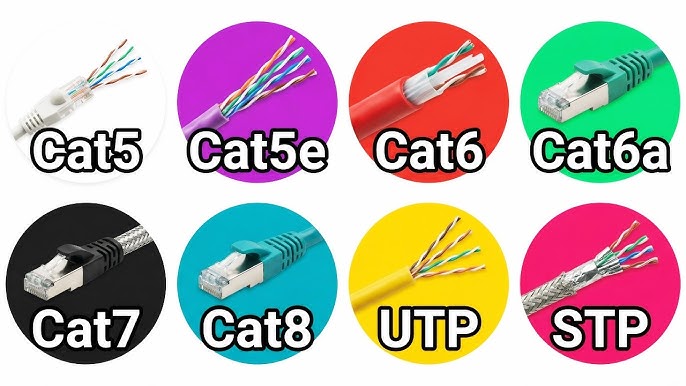
Ethernet cables hook up devices in networks and are available in multiple types, each with its own speed, bandwidth, and shielding limits. The primary ones used today are Cat5e, Cat6, Cat6a, Cat7, and Cat8. Every increment in category introduces new advantages, from increased speeds to improved shielding. Conductor gauge and the twisting of conductor pairs both have a significant impact on a cable’s performance. The lower the gauge number, the thicker the wires for stronger signals. Cable categories also have distance limits. Most top out at 100 meters, with the exception of the newest, Cat8, which is shorter.
1. Cat5e
Cat5e, or Enhanced Category 5, is in most homes and small offices. It supports speeds up to 1 Gbps at 250 MHz, which is sufficient for web browsing, streaming, and basic file sharing. The design employs twisted pairs to reduce crosstalk and preserve clean signals, even in jam-packed device rooms. Cat5e cables are backward compatible with older standards such as Cat5, simplifying upgrades.
For the budget minded, Cat5e is a solid choice. It provides dependable service for the majority of everyday work without a hefty expense. Streaming movies or video calls do beautifully on Cat5e, so long as your network isn’t too heavily loaded.
2. Cat6
Cat6 cables step up the game with speeds up to 10GBPS for shorter links. Bandwidth reaches 250 MHz and the enhanced shielding makes a genuine impact by eliminating crosstalk from adjacent cables. Folks decided to use cat6 for gaming or video streaming, where fast, reliable connectivity counts.
Cat6 is prevalent in new constructions and small enterprises. It’s a great value if you’re looking to future-proof your setup without going crazy.
3. Cat6a
Cat6a (“augmented” Cat6) is designed for high-bandwidth installations. It supports 10 Gbps speeds over the entire 100 meters due to additional shielding that deflects external interference. The twists and thicker conductors inside maintain the signal crisp. Cat6a shines in large offices, server rooms, or wherever you require robust, consistent connections.
Opting for Cat6a does come at a cost. For the home user, it’s overkill. In the enterprise or data center, that cost more than makes up for itself in headaches and downtime saved. Some manufacturers, like oufu, offer custom Cat6a cables to fit unique needs.
4. Cate7
Cat7 cables take this one step further. The cables can handle speeds of up to 10 Gbps and a bandwidth of 600 MHz, utilizing S/FTP shielding for tough protection against interference. This makes them a safe bet in locations with all sorts of electronics or busy wiring.
This additional shielding and higher spec mean Cat7 cables are “future-proof” for a lot of users. They use standard RJ45 connectors, which means you can usually just swap them in without overhauling your entire network infrastructure.
Cat7 is pricier and not always necessary in most homes. It can be a wise choice for those thinking years down the line or operating in tougher environments.
5. Cat8
Cat8 takes pride of place at the top. It’s designed for data centers, where every bit of speed counts. Cat8 supports speeds of 25 to 40 Gbps for short runs of up to 30 meters. This makes it excellent for connecting servers or switches in a rack.
If you’re running a business with huge data requirements, Cat8 is an investment in speed and reliability. The thick shielding and heavy gauge interior provide maximum performance at a premium price. For the average home user, it’s overkill, but for high-end configurations, it’s a game changer.
A Cable’s Inner Anatomy
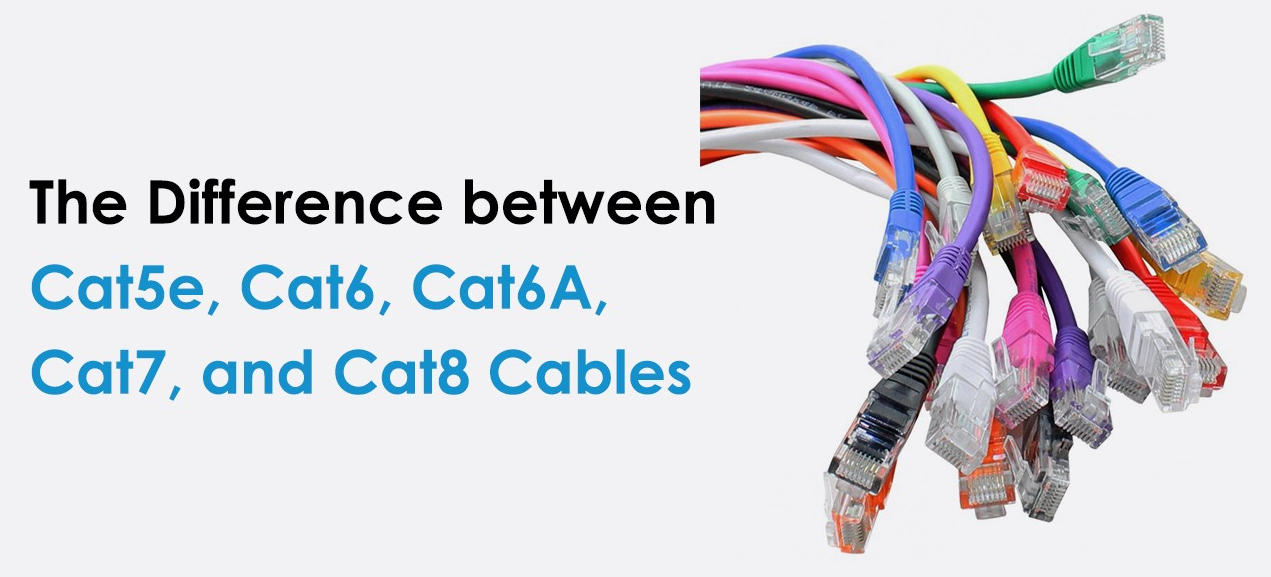
Ethernet cables are more than just wires twisted in plastic. Their internal composition determines the efficiency of data transmission and network reliability. Every component inside those cables collaborates to tame speed, control signal loss, and maintain connection stability. The materials you choose and how you put them together can make all the difference, from durability to performance in high-interference environments.
Key components inside an Ethernet cable:
Conductors (usually copper, solid or stranded)
Twisted pairs of wires
Insulation around each conductor
Shielding (optional, varies by type)
Outer jacket for protection
Standard RJ45 connector for most cables
It’s this internal design — how tightly the pairs are twisted, what kind of shielding is used, and what sort of jacket — that determines everything from speed to how much interference a cable can block. Case in point, Cat8 has a larger diameter of 0.0253 inches compared to 0.0201 inches for Cat5e, and that’s not just a cosmetic difference. Thicker conductors, such as 22 AWG or 23 AWG, can carry more current and have less chance of signal degradation over longer runs. However, conductor size is not the sole determinant. The twists and shielding are a big factor as well.
Shielding
Shielding shields out noise and interference. Unshielded cables (UTP) perform adequately in calm environments. Shielded cables (FTP, S/FTP, or U/FTP) are preferable in areas rife with electronics or power lines. Cat7 cables commonly employ S/FTP shielding, where each pair is individually wrapped in foil and all pairs have an extra braid around them. This is excellent for maintaining signal integrity at high speeds.
If you’re operating in an office environment with lots of devices, shielded cables contribute to keeping data error-free and speedy. For home or small networks, unshielded cables will do. The right decision is context dependent.
Twists
So twisted pairs are the secret weapon in Ethernet cables. By twisting the two wires together, the cable can fend off electromagnetic interference and prevent crosstalk between pairs. The tighter the twist, or twists per inch, the better it blocks noise. Cat6a and Cat8 cables tend to be more twisted than older cables, which helps them deal with faster data and greater bandwidth.
Twisted pair wiring is the reason why even slender cables work perfectly in huge networks. A minor convenience, but so worth it. If the twists aren’t right, even a good conductor or thick cable can come up short of its advertised speed.
Jacket
The jacket is the cable’s skin. It protects all those inside innards from bumps, bends, and even temperature fluctuations. Typical jacket materials are PVC for general purpose and LSZH (Low Smoke Zero Halogen) for locations where fire safety is paramount. Then you’ve got CM, CMR, CMP, and the like. These indicate whether a cable is suitable to be run in-wall, in a riser, or in an air duct.
Choose the appropriate jacket for the location in which you’ll run your cable. A rugged, pliable jacket adds up to more life and less hassle. If a cable is run outdoors or in a factory, seek out jackets rated for rougher conditions.
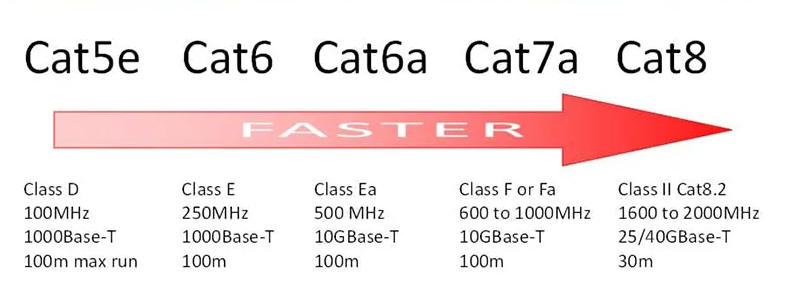
Decoding Real-World Performance
Cat5e, Cat6, Cat6a, Cat7, and Cat8 Ethernet cables all boast shiny specs, but what do you get when you actually use them? Specs frequently don’t tell the full narrative. Real-world speeds depend on a wide range of factors, from the cable itself to your network gear, your layout of space, and even local sources of interference. Testing and certification ensure these cables deliver as promised, but the network’s actual performance depends on speed, bandwidth, and distance, all shaped by a mix of science and context.
Speed
Cable Type | Max Speed | Max Distance |
|---|---|---|
Cat5e | 1 Gbps | 100 m |
Cat6 | 1 Gbps | 100 m |
Cat6a | 10 Gbps | 100 m |
Cat7 | 10 Gbps | 100 m |
Cat8 | 40 Gbps | 30 m |
Network gear like switches and routers may throttle your speed. For instance, even Cat6a cables can’t achieve 10 Gbps if your devices cannot. Actual speeds can be lower if you run cables near power cords or through crowded ducts. Interference drags things back. Cable length matters as well. Ten Gbps speeds start to fall off past 55 meters or so, so if you’re running cables longer than that, you may not get top speeds even with the highest-quality cables. Choosing the right cable means matching it to your needs. Cat5e is often enough for home use, but offices or studios might need Cat6a or higher for big files or lots of users.
Bandwidth
Bandwidth is the amount of data your cable can transmit simultaneously. Cat5e provides 100 MHz, which is good enough for video streaming and web surfing in the majority of homes. Cat6a and Cat7 go higher, up to 1000 MHz, which comes in handy on congested networks or video calls. More bandwidth means you can hook up more devices without bogging down the entire system. If you intend to use cloud backups or heavy streaming, selecting a cable with higher bandwidth may save you headaches down the road. It’s a clever way to ensure your rig stays current as technology evolves.
Distance
All twisted pair ethernet cables have a maximum run of 100 meters. That’s the “magic number” for both home and office. If you have to go farther, say wiring a warehouse, you’ll have to add switches or repeaters to maintain signal strength. Longer cables translate to weaker signals and more errors, particularly at high speeds. Cat6a, Cat7, and Cat8 don’t extend the distance; they only ensure your data remains uniluted over that 100 meters. When planning, be sure to measure your space first and keep cable runs as short as possible for best results.
How to Select Your Cable
Picking the right ethernet cable comes down to matching what you need with what each cable is optimized for. The main factors to weigh include:
Network speed and bandwidth requirements
Cable length and installation layout
Future-proofing and upgrade plans
Budget constraints
Network environment (home, office, or data center)
Device compatibility and Power over Ethernet (PoE) needs
Scalability for growth
Home Use
Most household networks will work for Cat5e or Cat6. Cat5e supports speeds of 1 Gbps up to 100 meters. Cat6 is good for 1 Gbps up to 100 meters and 10 Gbps up to 55 meters, making it our go-to for streaming, gaming, and easy upgrades. For small apartments or houses, the cable length is seldom a concern. For larger homes or running cables between floors, verifying your layout and distances is crucial.
If you want to future-proof your home or plan to upgrade your internet speed, Cat6a is a strong pick. It features a greater bandwidth of up to 500 MHz and supports 10 Gbps over 100 meters. Cat6a is better for PoE, which is important if you utilize smart home gear or Wi-Fi access points. There are Cat7 and Cat8 cables too, but they can be more difficult to terminate, more expensive, and generally overkill for home environments.
Office Networks
Offices have more users, so bandwidth and speed count for more. Cat6 or Cat6a can handle gigabit speeds, which is ideal for file sharing, video calls, and cloud storage. Cat6a’s higher frequency and shielding help reduce interference in crowded cable trays. For expanding networks, Cat6a shines as a future-proof pick, particularly in structured cabling for core switches and extended horizontal runs.
About how to choose your cable. Offices move and change, so tidy, tagged cables pay off. Cat6a’s added shielding and thicker jacket makes it stiffer, but it rewards you with less signal loss and less downtime. How to Pick Your Cable Balance your budget with longevity. Cat6a is more expensive initially but tends to pay for itself.
Data Centers
Data centers require the speediest cables. Cat6a can handle 10 Gbps up to 100 meters. Cat7 can handle 40 Gbps for 50 meters, and Cat8 can handle 40 Gbps for 30 meters. Cat8 is ideal for short runs between racks or switches, where speed and bandwidth are mission-critical.
Cable management is king in a data center. Well-managed cables result in fewer mistakes and simpler updates. Cat6a is common for wireless access points and core switches, with Cat8 reserved for server uplinks. These higher-category cables are more expensive, but downtime and slow speeds cost even more in a data center, so the investment is worth it for peace of mind.
Installation and Longevity
Ethernet cables – Cat5e to Cat8 – are the spine for the majority of wired networks globally. How you install these cables will influence their performance and longevity. Good installation practices, environmental considerations, and cable care all have a role to play in maintaining a smoothly running network.
Bending
Bending and twisting cables can break the wires inside or interfere with the signal. All cables have a minimum bend radius, so you can’t bend it tighter than roughly four times its diameter. For instance, a 6 mm diameter Cat6 cable can’t be bent with a radius smaller than 24 mm. Disregard this rule and you risk signal degradation or worse, outright failure, particularly with thicker cables such as 24AWG employed in longer runs.
Cable routing counts as well. Neat, well-managed cables stay longer and perform better. Stuffed server racks or sharp turns behind desks are trouble spots. Flexible Slim Patch Cables might assist in cramped spaces, but these have increased DC resistance and extend just 15 meters. For anything longer, normal gauge patch cables are more secure. Always route to avoid pinching, tight bends, or stress at connectors.
Environment
Heat and humidity degrade cables. Cat5e or Cat6 ethernet work well for most offices, but outdoor or industrial sites require sturdier, rated cables. UV, extreme cold, or chemicals can eat away at the outer jacket and disrupt data signals. For outdoor runs, we use shielded cables or cables in conduits to protect from the weather and critters. If cables pass by machinery or through factories, select cables with jackets that are oil and chemical resistant. It’s prudent to keep cables apart from power lines to avoid interference.
Short cables in clean, dry locations can get away with plain jackets. In more abrasive places, go for covers or run cables in sealed conduits. This tiny bit of foresight can extend cable life by years and maintain performance in the roughest of patches.
Termination
Termination is about terminating connectors, such as the ubiquitous RJ45, to the ends of Ethernet cables. Doing this right is key for an in-depth, rapid link. Poor terminations cause dropped connections, slower speeds, or even outages. Longer runs, up to 100 meters, typically employ solid copper wire for optimal outcomes. Patch cables for short hops typically have stranded wire, which flexes more easily without snapping.
Not to mention installation. If you’re unsure, the pro installers have specialized tools to measure pin positions exactly. Missteps here will slash your speed or kill the link, notably in high-speed networks with Cat6a or Cat8. If your network is going to last, don’t shortchange the termination.
Installation Checklist
Route measurements and cable runs should be under 100 meters for most categories or 30 meters for Cat8.
Install solid copper lines for the long runs and marooned for brief spells.
Respect the minimum bend radius. Avoid sharp bends and pinches.
Avoid heat, moisture, and intense electrical fields with your cables.
Choose the correct cable rating for outdoor or rugged environments.
Finish cables with good connectors or hire a pro for complicated work.
Use repeaters or fiber if you want to go farther than 100 meters.
Beyond the Category Number
Selecting an Ethernet cable is way more than just choosing Cat5e, Cat6, Cat6a, Cat7 or Cat8. Sure, every cable boasts its own specs, but things like shielding, flexibility, build quality and certifications make a huge difference in actual usage. Understanding what’s beyond the jacket of every cable type helps you build networks that stand the test of time and high performance, regardless of the environment or requirements.
Power over Ethernet
Power over Ethernet (PoE) allows a single cable to provide both power and data. This is a leap forward for device-heavy environments, such as offices or security installations. With PoE, you don’t have to run power lines out to things such as IP cameras, WAPs, or phones. Less clutter, less cabling, and easier installs are all obvious victories.
PoE plays best when you engineer the power requirements of every device into the design from the beginning. Other equipment, particularly powerful units, require additional current, so verifying your cord’s rating ensures smooth operation. Selecting cables that facilitate the appropriate PoE standard, such as Cat6 or higher, prevents voltage drops and maintains your devices’ stability. For instance, a long run to a security camera on the other side of a building requires a cable that can carry both the data and the power without depreciating either.
Build Quality
Build quality is easy to ignore until it isn’t. Jackets with a strong bite, solid copper conductors and connectors that don’t loosen extend the life of your cables and keep your connections strong. Premium materials, such as 22 AWG copper in Cat8, reduce the chance of failures, particularly on long pulls or in challenging environments.
Some cables have additional shielding. That helps block out interference from other lines or machines, resulting in fewer dropped signals and cleaner data. Flexibility counts, particularly in cramped server rooms or when you have to route cables around corners. A bendable-to-the-point-of-not-breaking cable makes installs simpler and reduces future headaches. Branded good quality often costs more, but it saves time and money over years of use because you don’t get outages or have to re-run cables.
Conclusion
Choosing the appropriate ethernet cable defines the speed and efficiency of your home or office. Cat5e suits straightforward setups or small rooms. Cat6 and Cat6a provide greater speed for busier environments and larger demands. Cat7 and Cat8 handle heavy work and lots of data, which is excellent for speedy equipment or large teams. They are each a type that suits an actual need, not just a marketing brand. Actual usage counts more than a box rating. Let’s see your equipment, your environment, and your intentions. A great cable keeps it all fast, crisp, and robust for years. Got a cable that simplified or sped up your life? Leave a comment, exchange advice, or inquire. Our best picks are from shared stories.
Frequently Asked Questions
What are the main differences between Cat5e, Cat6, Cat6a, Cat7, and Cat8 cables?
Cat5e supports up to 1 Gbps. Cat6 supports up to 10 Gbps at shorter distances. Cat6a provides superior shielding and supports up to 10 Gbps at longer distances. Cat7 and Cat8 offer greater speeds and better shielding for premium networks.
Which Ethernet cable is best for home internet use?
Speaking on the home front, Cat6 or Cat6a cables work best. They provide the fastest speeds, reliability, and are future-proof for streaming and gaming.
Can I use a Cat8 cable with older devices?
Indeed, Cat8 cables are backward compatible. They are backwards compatible with devices supporting lower categories, but the performance will be that of the slowest component.
How do Ethernet cable types impact network speed?
Higher category cables accommodate faster speeds and more bandwidth. Using the right type guarantees you get the most out of your internet connection.
Are more expensive cables always better?
Not necessarily. Select a cable that suits your network requirements. The higher categories provide more speed but only help if your devices can take advantage of it.
How long can I run an Ethernet cable without losing performance?
Regular cables such as Cat6 can span up to 100 meters without noticeable signal attenuation. For longer runs, consider shielded cables or network switches.
Does cable shielding matter for Ethernet cables?
Indeed, shielding safeguards against interference, particularly in densely populated electronic locations. Cat6a and higher typically provide improved shielding for consistent connections.