Understanding the distinction between a modem and a router empowers you to make smart choices regarding your home internet configuration.
Modem router combos provide easy setup and space-saving convenience, while separate devices allow for greater customization, adaptability, and usually superior performance.
For power users with lots of devices or super-fast connection requirements, separate modems and routers are generally more preferable for future-proofing, security, and customization.
Combo devices are great for casual users who want ease, and separate devices are perfect for advanced users, smart home junkies, and gamers.
Think about long-term expenses, such as being able to upgrade things and avoiding rental fees, when selecting your equipment.
Be sure to consider your current internet requirements and anticipate future innovations to keep your setup solid.
A modem router combo combines the modem and router in a single device, while separate units are distinct. They choose based on speed, price, and how easy they want setup. A combo keeps it easy with less wires and only one box to configure, which is great for small homes or minimalists. Separate devices tend to provide superior range and allow you to select more powerful models for each task. Some people want to be able to upgrade one piece without having to purchase an all-new combo. To assist you in making an informed decision, here are the definitive advantages and disadvantages of both configurations in practice.
Understanding the Core Components
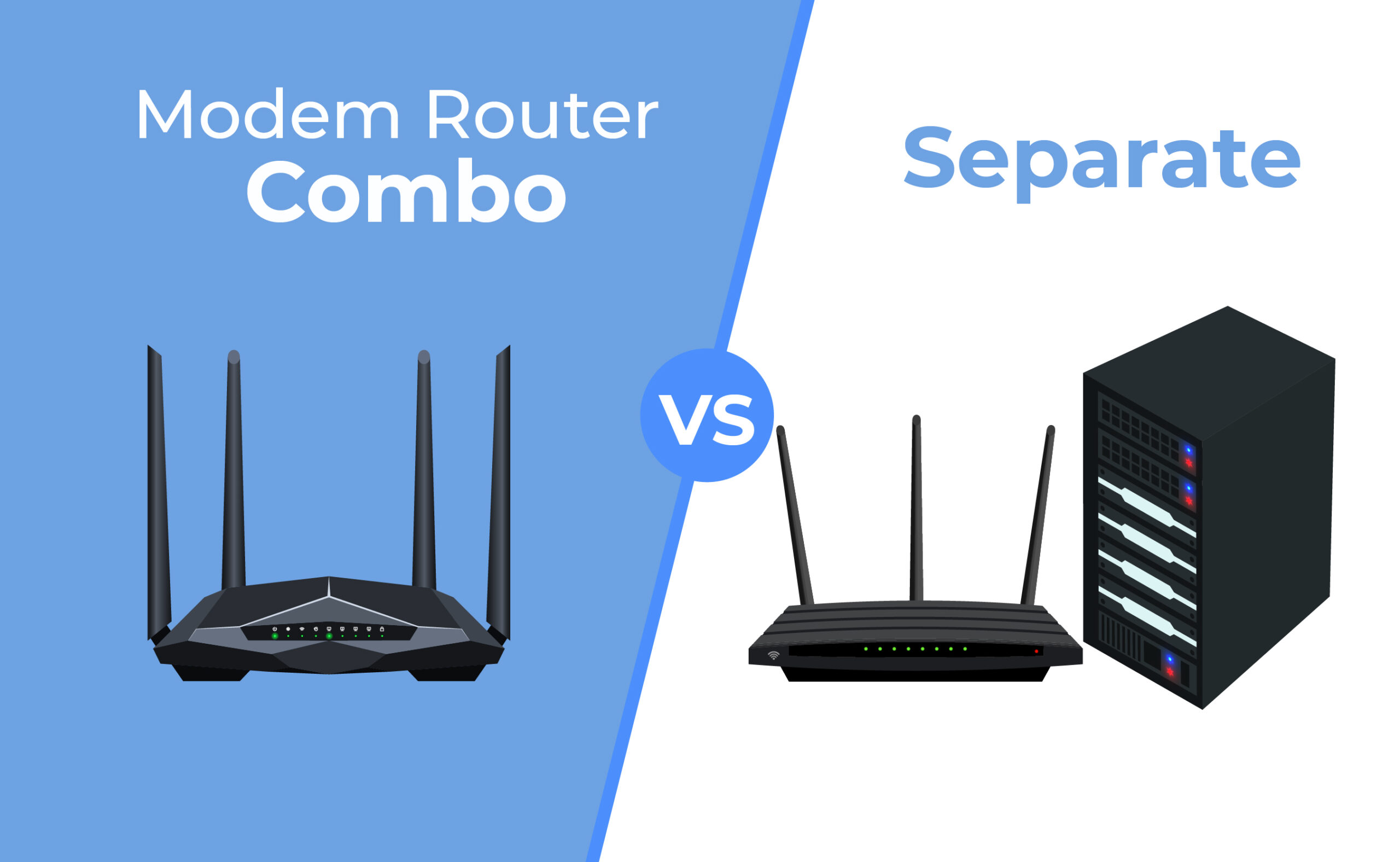
A modem and a router are the backbone of any home internet setup. Each has a unique and critical role in breathing internet life into a room. For clarity, here’s a numbered list that shows what each does:
Modem: This device connects your home to your internet service provider. It receives the signal from your serviceman via cable, fiber, or phone line and translates it into something your devices can understand and utilize.
Router: This piece spreads that changed signal out to all your devices. It allows you to hook up laptops, phones, smart TVs, and everything else simultaneously. It keeps those devices communicating with one another and the broader web and erects simple security fences.
A modem router combo combines both functions in a single box. You plug it in, fire it up and usually, it just works. This frees up room and can reduce clutter, particularly in more compact houses or apartments. A lot of people choose these combos for easy installation and cost savings. If you just want to get online, share the web with a few devices and don’t intend on hacking settings, a combo does the trick with less hassle. When you need to upgrade, you have to replace the entire unit—even if only the modem or router half is obsolete.
With separates, you choose, so you have a device for each task. This occupies more space but provides a lot more control. If you live in a busy household with 25 users or smart gadgets, a dedicated modem and router can maintain consistent speeds and manage more traffic. When the web speeds up or new features arrive, think Wi-Fi 6/6E, tri-band, mesh networks, and enhanced security. You only have to upgrade the piece you want, not both. Contemporary routers can manage more gadgets, provide more powerful visitor networks, and maintain seamless streaming with elements such as MU-MIMO, OFDMA, and QoS. In a Wi-Fi standard-hopping world, isolated configurations allow you to stay current without going broke.
Modem Router Combo vs Separate: The Showdown
A modem router combo puts both into one box. That makes it easy and compact. Separate means your modem and router sit apart. Both configurations affect the way you utilize, configure and expand your network.
1. Performance & Speed
A modem router combo can satisfy basic speed requirements for most households. High-performance separate routers typically beat out combos. They blast out more powerful Wi-Fi, cover larger areas and support more devices simultaneously. If you have a lot of devices or 4K streaming, you’ll feel the lift. Combos can run hot as both components share a single box, which can bog them down under strain.
Combos tend to have sufficient speed for light browsing and streaming.
Separate devices enable faster internet plans, sometimes exceeding 1 Gbps.
Bandwidth is better handled by a high-end standalone router.
More devices on a network can slow down combos faster than separate.
Separate setups tend to experience less lag. With combos, heavy use can create bottlenecks. The modem’s tech matters as well. New standards like DOCSIS 3.1 in a modem turbocharge speeds for both configurations.
2. Customization & Control
With separate routers, you open up more custom settings. You may customize networks, configure guest WiFi, and deploy updates. Advanced firmware provides you even more control. Combos are easier but restrict what you can swap. Others allow you to customize just simple functions.
If you want to customize your network, separates triumph. You can choose a router with superior parental control or security features. For power users, separate components allow you to stay current with new technology and updates.
Security is simpler to manage with a quality standalone router. Update firmware, block dangerous sites, or set up firewalls. A few clicks and you’re done.
3. Upgrades & Future-Proofing
Separate devices keep upgrades simple. If your modem goes bad, replace it. Want improved Wi-Fi? Upgrade only the router. With combos, if one fails, you replace the whole box. Tech keeps advancing, so swapping parts helps save stress and money.
Think ahead. Quick internet is going to require quicker gear down the road. Separate setups allow you to stay current without purchasing an entirely new system.
4. Cost & Long-Term Value
Combos typically are cheaper upfront. In the long run, separate devices can save you more. Renting from your provider adds up, sometimes equaling more than buying outright. Good routers and modems last longer and perform better.
Going one upgrade at a time is gentler on your spending habit. You steer clear of paying twice for features you don’t require. This comes in handy as tech and your requirements evolve.
5. Simplicity & Setup
Modem router combos are plug and play for most folks. One box, one setup. That’s fewer minutes wasted in guide land. Separate devices require additional cables and configurations and some technical expertise.
Combos are frequently equipped with convenient apps or web tools to assist in managing your network. You sacrifice some advanced guts for this simplicity.
If you want complete control, you will dedicate more time to configuring separate equipment. To many, a combo means fewer hassles but less space to expand.
The Hidden Trade-Offs
All these trade-offs are the ones that tend to be invisible until you feel them in everyday use. Though combos appear tidy and compact, this convenience can be at the expense of versatility and dependability. While separate devices can require some technical knowledge to configure, they provide scalability, improved performance, and a security buffer that many forget about.
Firmware Neglect
Firmware updates keep a network safe and smooth. Modem router combos don’t necessarily receive updates as fast or as frequently as stand-alone ones. This gap exposes them to legacy vulnerabilities or security holes that updated software might plug. If a combo device doesn’t receive updates, it might fall behind the latest connection speeds or security standards. For example, a combo might not support new VPN features or Wi-Fi standards, leaving users marooned with legacy tech. Checking the support page for a device prior to purchase reveals the frequency of updates. Without regular updates, a home’s network might lag behind or even face hacks that exploit unpatched vulnerabilities.
Failure Scenarios
A combo trades on the hidden trade-offs. If the modem or router part goes, the whole connection goes down. Troubleshooting becomes complicated since it is difficult to determine whether the issue lies with the modem or the router. With two gadgets, you can trade off the busted one and keep the other one humming. This division stabilizes home networks, which is valuable to those who telecommute or require consistent connectivity for video conferencing or remote learning.
Scenario | Combo Device Impact | Separate Devices Impact |
|---|---|---|
Modem failure | Complete outage | Only modem offline |
Router failure | Complete outage | Only router offline |
Overheating | Both functions affected | Isolated to one device |
Firmware issue | Harder to troubleshoot | Easier isolation |
Remote or rural users may not have rapid support if their single device crashes. Separate units, on the other hand, allow you to maintain at least some service during a fix, which is crucial when outages are long.
Heat & Lifespan
With modem and router both crammed into one box, combo units run hot. This heat accelerates wear and can reduce the device’s lifespan. If you’re in a small or crowded area, bad airflow can exacerbate this, leading to slowdowns or even abrupt shutdowns. Stand-alone modems and routers can afford better cooling and bigger vents, which makes them live longer. Putting devices in open, airy locations does a lot to keep them operating optimally. For people in hot climates or low air-conditioned households, this decision can be the difference between rock-solid connections all year long and unexpected dropouts when the temperature rises.
Which Setup Suits You?
Modem Router Combo vs. Separate: Which Setup Suits You? What’s the right setup for you, your online habits, the speed demand of your household, and the amount of devices you plug in. Compatibility with your internet provider and future upgrade plans are important as well.
How many devices you plan to connect at once
The speed you need for downloads, streaming, or gaming
Your comfort with setting up and fixing tech gear
Space and cable management in your home
Budget for buying or upgrading equipment
Interest in advanced features such as parental controls or traffic shaping.
The Casual User
Light users peek at email, scroll Facebook and binge shows in SD. They might have a handful of high-powered devices and seldom stretch their connection to the limit. For these individuals, a modem router combo keeps it easy. One box, less cords, simple setup, no headaches. It’s the default for simple requirements.
Solid streaming and surfing win over newfangled bells and whistles. Combos provide sufficient horsepower for home offices or streaming marathons without stutters. Price is important here. Combos cost less initially, which is an easy choice if you’re on a budget or moving soon.
The Power User
Power users depend on speed for massive downloads, work, or passing around huge files. Most operate video calls, edit online docs, or run servers. Separate devices are best if you want total control. You can choose a premium modem and pair it with a premium router.
Advanced features, like Quality of Service, assist you with prioritizing crucial traffic, prioritizing work or video calls. If you lust for the ability to upgrade later, this setup suits. Upgrade to a router with the latest tech, or complement your setup with mesh as your needs evolve.
The Smart Home Enthusiast
A smart home user connects multiple IoT devices, such as thermostats, cameras, and lights, frequently and simultaneously. These setups require a powerful, dedicated router that can support dozens of connections and keep them secure.
Security is more relevant here. Good routers allow you to set up guest networks and secure your main network further. Mesh compatibility is useful. If your home is big, a mesh system distributes your connection everywhere, even to those hard-to-reach corners.
The Online Gamer
Gamers require low response and consistent speeds. Even a tiny lag can make the difference between victory and defeat. Dedicated gaming routers, one kind of separate router, are made for this. They allow you to mold traffic with games first.
Game prioritization and advanced QoS settings mean buttery smooth play. Wired connections are ideal because they eliminate the possibility of dropped Wi-Fi and maintain your ping smooth, even in peak periods.
My Personal Recommendation
It’s not about determining a clear winner when it comes to a modem router combo versus separate devices. Both setups have their utility and fit better in different homes. For individuals who need an easy and inexpensive entry into the online world, a modem router combo is typically the best option. It saves space, reduces cables, and is simple to install. If you rent or move a lot, a combo keeps it light and easy. For casual surfing, streaming, and emailing, the combo gets the job done. In my own digs, I began with a simple combo. It was quick to set up and perfectly adequate for basic requirements.
As my needs grew, I found them lacking. If you’re looking to upgrade your internet or just want faster speeds, individual devices could save you more money in the long haul. With individual units, you can replace just a component if it cracks or ages. That doesn’t mean you have to purchase an all new setup. If anything blew up, it was simpler to identify the issue. I had a router go bad once, and I could simply swap it out without disturbing the modem. This maintains your configuration and reduces the price tag over time.
Folks who care about strong Wi-Fi, better security or large homes should check out separate devices. Certain combos have feeble range, and large mansions can develop dead areas. My personal advice is to use a quality router with a powerful signal or a mesh system to blanket every single room. Individual routers provide you with additional choices, such as more robust firewalls or VPN compatibility. This is a big deal if you work remotely or have sensitive information to protect. I discovered that my web remained reliable, and I fretted less about lag or overheating after I switched.
In selecting your configuration, consider how you access the web and what you may require. It’s wise to invest in solid equipment. It rewards you with less stress and improved speed. I always tell friends: pick what fits your life, do not just go for easy. A little extra effort up front can yield superior returns for years into the future.
Making Your Final Choice
Ultimately, whether to go with a modem router combo or separate devices is about what suits your life. A combo unit is one device, less clutter and quick setup. It’s perfect for small flats, or when you simply want to plug in and go online. For a lot of people, that’s all they require — casual web browsing, movie streaming or light telecommuting. If you demand more from your network, dedicated devices provide more control. You can select a high-end router for superior wifi, or replace the modem if you switch internet providers. If you live in a big house or have tons of people online, a powerful router can keep everybody connected.
As you consider your options, consider what you do online. For example, if you’re a gamer, you may want a low ping router with good range. If you work from home and conduct video calls, seek a configuration that remains stable even if others binge shows or game simultaneously. See what your internet provider supports. Others only allow you to use specific modems, which might restrict your selection.
A simple checklist can help make things clear:
Space: Do you want fewer devices or do you not mind extra gear?
Budget: Combos often cost less up front. Separate units can last longer.
Flexibility: Do you need to upgrade just your router or modem later?
Speed: Does your provider offer fast speeds and what does your plan need?
Tech comfort: Are you okay with setup and updates, or do you want easy plug and play?
Future: Will your setup work as internet speeds and technology change?
Think forward. Internet technology continues to accelerate. Equipment that supports new standards, such as Wi-Fi 6 or upcoming cable systems, will keep your home primed for speed or capacity increases. Choosing options that allow you to upgrade as things evolve is a clever way to steer clear of changing it all out too early.
Conclusion
Either setup can get you on the web and allow you to stream, game, or work remotely. A modem router combo reduces wires and space. It requires less configuration. You pay less upfront as well. Two devices allow you to swap out or upgrade more frequently. You can experience greater speeds and network control. Certain people like it easy, some want more control over their Wi-Fi. Consider what suits your space, wallet, and intention. Experiment with what works for you. Tell us your story or tip—others could benefit from your triumphs or slip-ups. Your selection defines your online existence—select what works best for you.
Frequently Asked Questions
What is the main difference between a modem router combo and separate devices?
A modem router combo bundles both into one device, while separate devices consist of a dedicated modem and router. This impacts flexibility, performance, and upgrade paths.
Are modem router combos easier to set up?
Yes, modem router combos tend to be simpler to configure. They have fewer cables and one device to set up, which is great for beginners.
Which setup offers better performance?
Separate modems and routers generally perform better. They let you select top-of-the-line, specialized devices and replace each part when you want faster or more reliable performance.
Can I upgrade my internet speed more easily with separate devices?
Yes, separate devices make upgrading easier. When you upgrade your plan, you can replace just the modem or router, giving you more flexibility and a longer lifespan.
Do modem router combos save space?
Sure, modem router combos save space. This minimizes mess and is perfect for compact apartments.
Are separate devices more expensive than combos?
Typically, separate things are more expensive upfront than a combo. They can pay off down the road by enabling targeted upgrades rather than swapping the whole unit.
Which setup is better for large homes?
Individually, they are normally better for big homes. They tend to deliver broader Wi-Fi coverage and improved performance, particularly when combined with high-end routers or mesh systems.