Knowing the fundamental distinctions between singlemode (OS) and multimode (OM) fibers will assist you in choosing the optimal cable for your networking requirements, whether it’s high-speed data centers or expansive campus networks.
Core diameter and light source are two factors that directly affect a fiber’s performance. They affect transmission distance and data rates for various applications.
Bandwidth and transmission distance are crucial considerations when planning network upgrades. They provide peace of mind that your investment will be capable of supporting today’s and tomorrow’s needs.
Jacket color coding simplifies installation and maintenance. It allows professionals to identify fiber types at a glance and maintain organization across large, complex networks.
Taking the time to consider installation difficulty, environmental concerns, cost, and other practical issues can prevent you from wasting time, money, and headaches down the road.
By future-proofing your network with an eye toward fiber types, you’re enabling seamless scalability and flexibility in meeting ever changing technology demands.
OS1, OS2 versus OM1, OM2, OM3, OM4, and OM5 fiber optic cable differences are really about core type, performance, and how they operate in networks. OS1 and OS2 are single-mode cores that function optimally for long runs and fast data, as seen in large data centers or intercity links. OM1 to OM5 have multi-mode cores, each designed for shorter connections and varying speeds, ranging from standard office environments to rapid backbones. They each have their own core size, bandwidth, and color code so people can select the proper cable for the application. To bring some clarity to all the different types, let’s see what distinguishes each of them in actual network applications.
The Fundamental Divide: OS vs OM Fiber
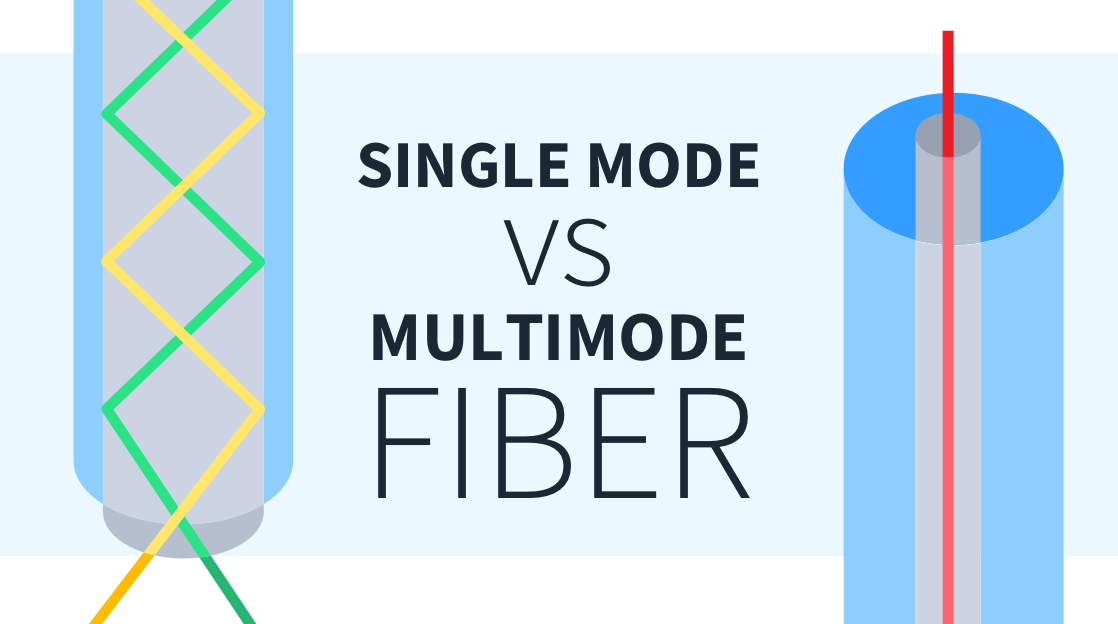
OS and OM fiber optic cables are designed for separate purposes, and understanding what differentiates them makes selecting the appropriate one easier. OS, or OS fiber, is designed for long-haul data transmissions using singlemode fiber technology. Its core is much smaller, roughly 9 micrometers across. This diminutive core allows light to propagate in a single mode, reducing attenuation and allowing signals to transmit greater distances with minimal degradation. OS fibers are optimized for laser light sources at 1310 or 1550 nm, making them the preferred choice for long-haul networks, such as undersea cables or WAN links between cities. Their immense bandwidth of up to 100,000 GHz fuels enormous data capacity, and their low attenuation rates of 1.0 dB/km for OS1 and as low as 0.30 dB/km for OS2 at 1550 nm keep signals robust over tens of kilometers.
OM, or Optical Multimode fiber, is meant for short range, like inside a building or on campus. Its core is significantly larger, either 50 or 62.5 micrometers wide, which makes it one of the key multimode fiber types. This enables more than one light path, or ‘mode’, to propagate simultaneously, but causes signals to become jumbled and degrade more quickly. OM fibers use less expensive light sources, such as LEDs or VCSELs, and operate at 850 or 1300 nanometers. Because the light diffuses within the larger core, OM cables are most appropriate for shorter distances, up to 550 meters at 10gb/s. This makes them a wise selection for interconnecting equipment in the same room, building, or data center. Although their bandwidth is less than OS, OM cables are economically viable for these short-haul requirements.
It all comes down to what you need: OS versus OM fiber. If you have to send a ton of data over kilometers, OS it is. For wiring up a data center or office, OM gets the job done. The differences in core size, light source, and wavelength all influence which fiber cable is best suited in each environment.
A Detailed Comparison of OS and OM Fiber Cables
Fiber optic cables can be categorized into two main groups: OS (Optical Single-mode) and OM (Optical Multimode). Each multimode fiber type caters to various requirements in networks, ranging from long-haul telecom to short-reach data centers, with distinctions in light transmission distances, data transfer speeds, and specific applications.
1. Core Diameter
Fiber Type | Core Diameter (µm) |
|---|---|
OS1/OS2 | 9 |
OM1 | 62.5 |
| OM2 | 50 | OM3 | 50 | | OM4 | 50 | | OM5 | 50
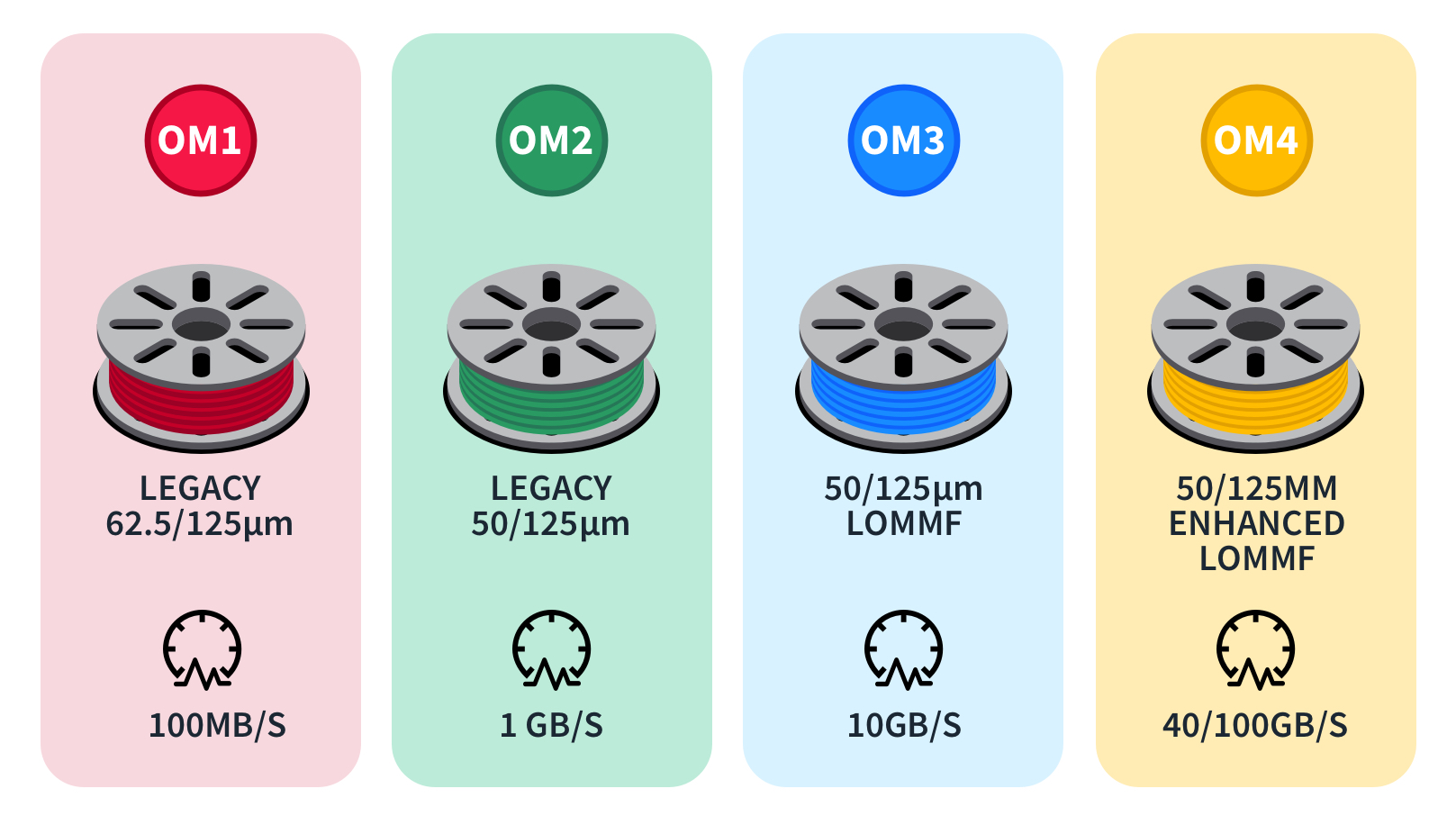
Bigger cores help multimode devices to be installed and aligned with greater ease, particularly when employing old connectors or splicing with legacy systems. In cramped server rooms or hasty deployments, that can be a definite bonus. The wide core of OM1 (62.5µm) suits old networks, while OM3, OM4, and OM5 (all 50µm) work better with newer, faster gear. For short links, such as within a building, the multimode fiber optic cable’s thicker core is an appropriate match.
This compatibility with varying cable types ensures that installations can meet the demands of modern data center applications. Moreover, understanding the differences between multimode fiber types aids in optimizing performance for different data rates and link distances.
2. Light Source
OS fibers combine with lasers, typically single-mode lasers, which generate a narrow beam that can travel significant distances with little attenuation. OM fibers primarily use LEDs or vertical-cavity surface-emitting lasers (VCSELs). LEDs are inexpensive and easy, but restrict both the speed and the reach of the signal.
Lasers consume more power than LEDs. They increase speed and maintain a tight signal over distance. In OM cables, the light source type alters the effective modal bandwidth. VCSELs, used in OM3 and newer, can push higher data rates farther than ancient LEDs. This makes OM3 and OM4 ideal for dense data centers pursuing 40G or 100G speeds.
3. Bandwidth
Single-mode fiber bandwidth is essentially unlimited for most applications, reaching up to 100,000 GHz. OM1 supports 200 MHz per kilometer, OM2 supports 500 MHz per kilometer, OM3 supports 2000 MHz per kilometer, and OM4 supports 4700 MHz per kilometer. OM5 takes it even further, as it is engineered for wideband applications and future networks.
More bandwidth means more data. So, OM3, OM4, and OM5 are sought after for 10Gb/s, 40Gb/s, and 100Gb/s links, particularly in larger networks. Fast Ethernet runs fine on OM1 and OM2 for short hops, but major projects require more bandwidth. Banks, hospitals, and cloud providers tend to opt for OM4 or OM5 to stay ahead of the increasing demand.
4. Transmission Distance
OS1/OS2 cables can transport data over 10 kilometers, even 40 kilometers or more, with minimal loss of approximately 0.4 dB per kilometer at 1310 nm. OM1 reaches 275 meters at 10 gigabits, OM2 reaches 550 meters, OM3 goes 300 meters, OM4 goes up to 400 meters, and OM5 is equal to or slightly better than OM4 with new equipment.
Selecting cable based on distance matters. For a campus or a city, single-mode triumphs. Inside offices or data centers, multimode is cheaper and easier, working fine below 600 meters. If the distance is too far with OM fiber, the data gets murky, so choosing the right type saves money and keeps everything humming.
5. Jacket Color
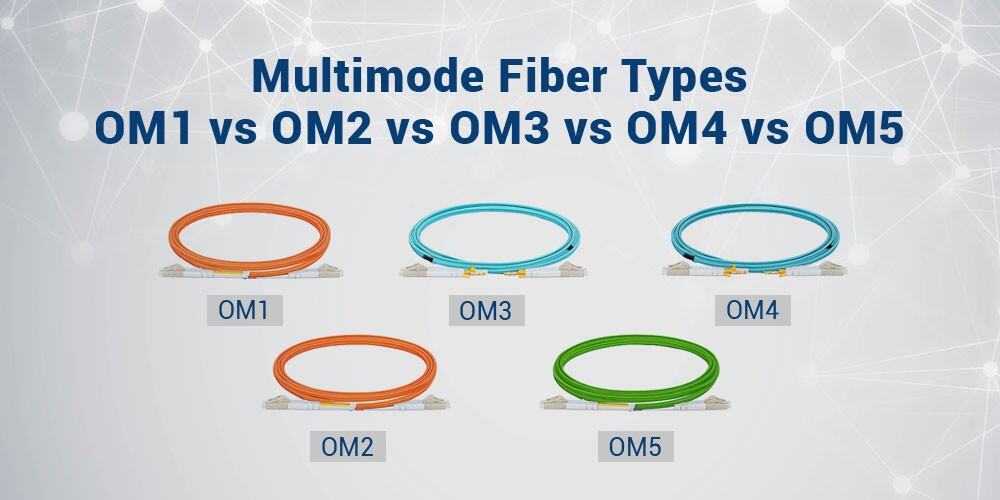
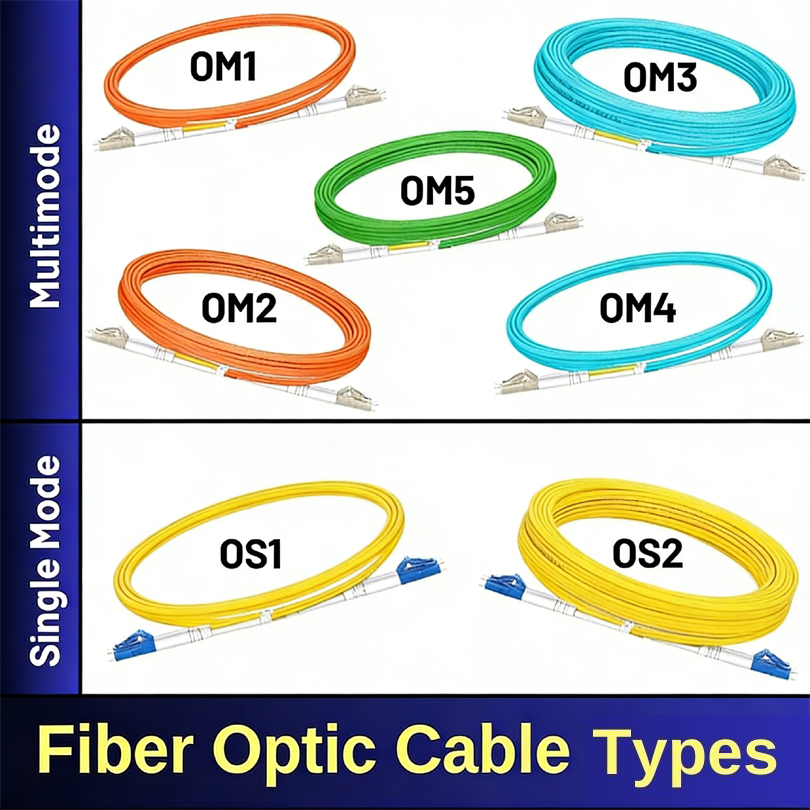
Fiber jackets have standard colors: yellow for OS1/OS2 single-mode, orange for OM1/OM2, aqua for OM3/OM4, and lime green for OM5. These colors assist techs in identifying the correct cable in an instant, reducing mistakes during installation or maintenance.
Color coding keeps racks neat and makes tracing lines a snap, even where cables accumulate. It assists with planning, as you can identify what’s here and what needs upgrading. For hybrid networks, sticking to the color guide keeps the job secure and speedy.
Beyond the Specs: Practical Realities
Choosing between OS (single-mode) and OM (multimode fiber) isn’t merely a datasheet number; real-world considerations such as installation and price dictate which type best suits a project. For shorter distances up to 550 meters, multimode fiber optic cables like OM3, OM4, and OM5 are prevalent in environments such as data centers due to their lower cost and easier connectivity. In contrast, single-mode fibers (OS1, OS2) are ideal for longer transmission distances over kilometers, such as in metro networks or campuses. Each of these multimode fiber types has practical realities that are crucial to consider when selecting the appropriate cable for the environment.
Installation Nuances
Single-mode cables have smaller cores, so they require more stringent controls in installation. Their bend radius is less forgiving, and termination requires precision tools and adept fingers. Multimode cables, with their bigger cores, are a smidge more forgiving to installers. You can get away with cheaper connectors, and the cables are less sensitive to slight bends. Even with multimode, rough treatment can cause signal attrition or harm.
Careful handling is crucial for both. A rushed job can kink a cable or leave dust at the connector, which reduces strength. Single-mode is trickier to install, not only due to its diminutive core size but because it requires laser-based light sources and more rigorous alignment.
Keep bend radius within the cable’s rated limit
Clean connectors before and after installation
Don’t drag cables across sharp edges or through narrow openings.
Use certified tools for termination
Cost Implications
Up front, single-mode cables and components cost more. Lasers and precise connectors contribute to the cost. Installation labor is higher because of the requirement for skilled technicians. In the long run, maintenance can be less if you pick the right fiber initially because single-mode offers higher bandwidth and upgrade paths.
Multimode, particularly OM4, can save data centers up to 550 to 600 meters. It employs less expensive LEDs and VCSELs. Simpler links imply faster installations.
For links under 600 meters, OM3 or OM4 reduces both material and installation.
Enterprise networks with fast growth could benefit more from OM4, which postpones upgrades.
Long-haul or high-speed projects obtain better future-proofing from OS2 despite the increased up-front cost.
Environmental Factors
Fiber cables are vulnerable to temperature fluctuations, moisture and mechanical strain. High humidity can infiltrate and deteriorate cables, while rapid temperature fluctuations can lead to expansion and contraction. That’s why hand-selecting fibers with rugged jackets and water-repellent coatings helps.
Certain environments — outdoor, trenches, factories, that sort of thing — require cables with additional protection. Not all fibers are rated for such harsh conditions. Jackets and armoring can add years to a cable’s life.
Use UV-resistant jackets for outdoor runs
Concealed in high traffic or rodent-prone areas, choose armored cables.
Choose water-blocking varieties for wet or flood vulnerable areas.
Test cables after installation, especially in tough spots
Which Fiber Suits Your Network?
What fiber fits your network? Every option alters your network’s coverage, bandwidth, and price. LANs, campus links, and sprawling long-haul lines each have their own requirements. OS1 and OS2 are single-mode fibers, appropriate for long lengths and high data rates, while OM1 through OM5 multimode fiber types are designed for short runs and swift installs. Knowing when to use each multimode fiber optic cable makes your network perform better and last longer.
Data Centers
Data centers rely heavily on multimode fiber optic cables to transmit massive data volumes between servers, switches, and storage. In this environment, speed and future growth are paramount. OM4 and OM5 multimode fiber types excel for high-demand workloads, allowing the transmission of 40, 100, or even 400 Gbps signals over 100 to 150 meters with remarkable clarity. Additionally, OM5 improves support for shortwave wavelength division multiplexing, enabling more data to be crammed into a single fiber.
Discover how a major cloud provider in Europe transitioned from OM2 to OM4 to enhance data flow and accommodate 100 Gbps traffic. The outcome is that with OM4 and OM5, data centers can rapidly expand and adopt new technologies without needing to overhaul their existing multimode fiber cable infrastructure. Choosing OM1 or OM2 may limit your growth potential, even though the initial costs are lower.
Campus Networks
Campuses—whether it’s schools, hospitals or business parks—frequently have to connect buildings not that distance away from each other. Multimode fibers such as OM3 and OM4 are popular choices for these short runs, typically less than 550 meters. They’re easier to install and function with less expensive light sources, so they’re a practical selection.
Bandwidth requirements on campus networks show no signs of slowing down. Video calls, cloud apps, and security feeds need more speed. For new builds, OM4 is a safe bet, allowing you to run 10 Gbps or more between buildings. Older configurations may have OM1 or OM2, which aren’t great beyond basic slow networks. For fast-growing sites or tech-savvy campuses, OM4 or OM5 should be in the cards from the get-go.
Long-Haul Telecom
Long-haul telecom lines run for kilometers, connecting cities and nations. Single-mode fibers, such as OS1 and especially OS2, are the backbone here. They transmit light much farther with less attenuation, making them perfect for distances beyond 5 to 10 kilometers. OS2 fibers carry 100 Gbps across long distances, which is ideal for high-speed internet and backbone networks.
All major telecom giant upgrades are now OS2 because of its low attenuation and support for DWDM (dense wavelength division multiplexing). Single-mode is more expensive, but it delivers dividends in reach and reliability. As the need for speed and distance networks increases, single-mode’s share will only get larger.
Strategic Selection and Future-Proofing
Selecting the appropriate multimode fiber cable is crucial to consider the future rather than just current requirements. With data consumption continuing to expand and networks accelerating, the cables you choose today determine what your network is capable of tomorrow. Understanding the distinction between OS (single-mode) and OM (multimode) fibers is essential. Single-mode cables, such as OS1 and OS2, employ a thin core that allows a single light trajectory to pass through, resulting in minimal attenuation and significantly greater bandwidth, up to 100,000 GHz. These shine on long haul work, such as linking data centers in separate cities or campuses. Multimode cables, OM1 through OM5, have thicker cores and allow more light paths in, but this restricts distance. For instance, OM1 supports up to 2,000m at slower speeds, while OM3 multimode fiber handles 10 Gbps up to 300m, and OM4 extends to 550m, delivering enhanced performance with 4700 MHz·km bandwidth.
With new technologies like cloud computing, AI, and 5G, the strain on networks continues to increase. These trends drive the requirement for cables that can expand with your business. Using OM4 or OM5 fiber, for instance, makes your system future-ready and accommodates reach for upcoming hardware and bigger data loads, particularly since OM5 performs at above 850 nm wavelength synergy with more advanced systems. It’s essential to consider the various multimode fiber types available to ensure your infrastructure can handle future demands.
Growth and change are inevitable, so factoring in space for additional traffic is wise. If you deploy a campus or office today with OM3, it’s good for short distances and middle-of-the-road speeds. If you anticipate more users or faster technology, OM4 or OS2 provides more headroom. When it comes to big upgrades, single-mode fiber is your best bet, particularly when you’re dealing with distances extending beyond 550 meters.
Network pros can take a few steps to future-proof their systems. First, chart anticipated data use for the coming decade. Consider where top speeds or long runs will be required. Choose cables that exceed current minimums, such as OM4 or OS2, to avoid expensive replacements down the road. You should always verify compatibility with your planned hardware and employ modular or high-density patch panels to simplify upgrades.
Conclusion
OS and OM fiber cables serve their own respective roles in network setups. OS1 and OS2 handle long, speedy runs, such as city links or large campuses. OM1 to OM5 suit short, quick works, such as workplace flooring or data rooms. Selecting the appropriate cable involves considering speed, distance, and your specific installation requirements. When making a significant jump in speed or distance, subtle nuances in fiber type can save you hours and dollars. True tales from network teams prove how the proper cable keeps work humming and frustration minimal. Need less lag or hassle? Consult your requirements, educate yourself, and consult a veteran. The better your prep today, the fewer mess-ups down the road. Give your next fiber project a solid start.
Frequently Asked Questions
What is the main difference between OS and OM fiber cables?
OS cables are single-mode fiber designed for long distance, high-speed transmission, while OM multimode fiber cables serve shorter distances, making them ideal for inexpensive local area networks.
Which fiber type is better for high-speed data over long distances?
OS (single-mode) fibers are optimal for high-speed and long-distance transmission, reducing signal loss and enabling higher speeds over distances greater than 10 kilometers, especially compared to multimode fiber types.
What do OS1 and OS2 stand for?
OS1 and OS2 refer to single-mode fiber, with OS1 designed for indoor use and OS2 optimized for outdoor applications, ensuring minimal signal loss over longer distances, crucial for high capacity telecommunication.
How do OM1, OM2, OM3, OM4, and OM5 differ?
OM1–OM5 are multimode fiber types, with higher numbers supporting faster speeds and longer distances. Specifically, OM3, OM4, and OM5 multimode fiber cables are optimized for higher bandwidth and laser transmission.
Can I mix OM and OS fiber cables in my network?
Don’t mix OM and OS fiber cables, such as multimode fiber and singlemode fiber, as they have different core sizes and transmission methods, leading to connectivity issues.
Which fiber cable should I use for future-proofing my network?
If you want to future proof, OS2 (single-mode) or OM4/OM5 multimode fiber types are best. They accommodate greater speeds and distances, making them ideal for growing local area networks and data center applications.
Are OM5 fibers compatible with older OM cables?
Yes, OM5 multimode fiber is backward compatible with OM3 and OM4 fiber types as well. To take advantage of OM5’s full capabilities, compatible multimode devices and transceivers are required.