In the rapidly evolving world of fiber optic communication, especially with the global expansion of FTTH (Fiber to the Home) networks, three critical fiber management devices play irreplaceable roles: Splitter Distribution Box (also known as FDB Fiber Distribution Box), ODF (Optical Distribution Frame), and Fiber Terminal Box. While these devices all serve the purpose of organizing and protecting fiber optic cables, they differ significantly in function, installation location, network position, capacity, and application scenarios. For network engineers, telecom contractors, and buyers looking to source fiber optic equipment, understanding these differences is essential to selecting the right device for specific projects—whether it’s a large-scale residential FTTH deployment, a data center backbone setup, or a home fiber access installation.
This comprehensive guide provides a detailed comparison of Splitter Distribution Box, ODF, and Fiber Terminal Box, We’ll break down their core definitions, multi-dimension differences, key functional distinctions, and application scenario guidelines, ensuring you have all the information needed to make informed decisions.
1. Core Definitions: What Are Splitter Distribution Box, ODF, and Fiber Terminal Box?
Before diving into detailed comparisons, it’s crucial to establish a clear understanding of each device’s basic purpose and design. Each device is engineered for a specific role in the fiber optic network, from the central hub to the end user.
1.1 Splitter Distribution Box (FDB)
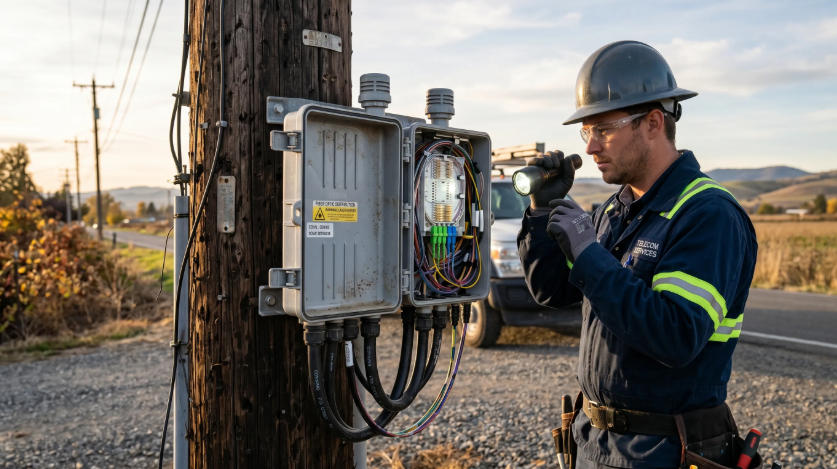
A Splitter Distribution Box, commonly referred to as FDB, is a specialized fiber management box designed primarily for optical signal splitting and distribution. Unlike other fiber boxes, it is built with an integrated optical splitter (such as 1:4, 1:8, 1:16, or 1:32 splitters), which allows a single trunk fiber optic cable to be split into multiple output fibers. This makes it a key component in FTTH networks, where it distributes signals from the backbone network to multiple household or business users.
Splitter Distribution Boxes are typically designed for both indoor and outdoor use, with robust waterproof and dustproof features to withstand harsh environmental conditions. They are available in wall-mounted, pole-mounted, or floor-standing designs, making them flexible for deployment in communities, building corridors, or outdoor utility poles.
1.2 ODF (Optical Distribution Frame)
ODF, short for Optical Distribution Frame, is a standardized rack-mounted fiber management device installed in indoor equipment rooms, data centers, or telecom central offices. It serves as the central hub for fiber optic cable management, responsible for fiber fusion splicing, jumper cross-connection, and centralized organization of backbone optical cables and trunk lines. Unlike Splitter Distribution Boxes, ODFs do not include optical splitters; their core function is to provide a centralized point for managing large volumes of fiber optic cables, enabling flexible network scheduling and maintenance.
ODFs are designed with a modular structure, allowing for easy expansion as network demands grow. They come in various core capacities, from small 12-core units to large 1440-core frames, making them suitable for large-scale network infrastructure.
1.3 Fiber Terminal Box
A Fiber Terminal Box, also known as a fiber termination box, is a compact, wall-mounted device designed for end-user fiber termination and protection. It is the final node in the fiber optic network, connecting the drop fiber cable (from the Splitter Distribution Box) to the user’s ONU (Optical Network Unit) or ONT (Optical Network Terminal) equipment. Unlike ODFs and Splitter Distribution Boxes, it has a small capacity and is designed for simple, low-maintenance use in homes, offices, or small commercial spaces.
Fiber Terminal Boxes are lightweight, compact, and easy to install, with basic dustproof and anti-collision protection. They typically include a simple splicing tray, fiber fixing rack, and adapter ports, making them ideal for terminating and protecting the final fiber connection at the user end.
2. Multi-Dimension Detailed Comparison Table
To help you quickly distinguish between Splitter Distribution Box, ODF, and Fiber Terminal Box, we’ve compiled a comprehensive comparison table covering the most critical dimensions.
Comparison Dimension | Splitter Distribution Box (FDB) | ODF (Optical Distribution Frame) | Fiber Terminal Box |
|---|---|---|---|
Main Function | Built-in optical splitter for signal splitting, fiber distribution, and wiring management; connects trunk fibers to user drop fibers | Fiber fusion splicing, jumper cross-connection, centralized backbone fiber management; enables network scheduling | Fiber cable termination, end protection, and simple wiring; connects drop fibers to ONU/ONT equipment |
Installation Location | Outdoor utility poles, building corridors, community weak current wells, indoor/outdoor wall-mounted | Indoor equipment rooms, data centers, telecom central offices, constant-temperature environments | Indoor household walls, office weak current boxes, user room corners, small commercial spaces |
Network Application Layer | FTTH Access Layer / Distribution Layer; connects backbone to user access | Backbone Layer / Convergence Layer; central hub of the entire optical network | User End Access Edge Layer; final node of fiber access |
Internal Configuration | Optical splitter (1:4/1:8/1:16/1:32), splitter tray, fiber splicing tray, pigtail, adapter ports | Splicing tray, fiber storage slot, patch cord ports, adapter panels, modular units for expansion | Simple splicing tray, fiber fixing rack, 2-8 adapter ports, basic wiring management |
Port/Core Capacity | Common: 12/24/48 cores; supports multi-user split distribution (up to 32+ users per box) | 12/24/48/72/96/144 cores; large capacity, expandable to 1440 cores for large-scale networks | Small capacity: 2/4/8 cores; designed for single household or small office use |
Waterproof & Protection Grade | Outdoor-grade: IP65/IP67; waterproof, rainproof, dustproof, anti-aging for harsh environments | Indoor-grade: IP30/IP40; dustproof, no need for outdoor waterproof protection | Indoor-grade: IP20/IP30; basic dustproof and anti-collision protection |
Mounting Method | Wall-mounted, pole-mounted, floor-standing; flexible for outdoor/indoor deployment | Standard 19-inch rack-mounted; fits into equipment room racks | Wall-mounted (embedded or surface-mounted); compact and space-saving |
Main Application Scenarios | Residential community FTTH deployment, building corridor fiber distribution, outdoor fiber access, rural fiber networks | Telecom central offices, data centers, campus networks, large enterprise backbone management | Home fiber access, office indoor fiber termination, small commercial fiber end points |
Structural Features | Sealed waterproof shell, independent splitter bin, anti-aging plastic/metal material, easy field maintenance | Standard rack structure, modular design, removable splicing trays, easy expansion and centralized maintenance | Mini compact size, light weight, simple structure, tool-free installation for end users |
Maintenance Difficulty | Easy; field-maintainable, plug-and-play splitters, no need for specialized equipment | Moderate; requires professional technicians for splicing and cross-connection, centralized maintenance | Almost maintenance-free; once installed, only occasional inspection is needed |
3. Key Difference Analysis
While the comparison table provides a quick overview, understanding the key functional, positional, and environmental differences is critical for selecting the right device. Below, we break down the most important distinctions to help you optimize your network design and equipment sourcing.
3.1 Functional Difference: Splitting vs. Management vs. Termination
The biggest difference between these three devices lies in their core functions, which directly determine their role in the fiber optic network:
- Splitter Distribution Box: The defining feature is its built-in optical splitter. Its sole purpose is to split a single trunk fiber signal into multiple output signals, allowing one backbone cable to serve dozens of users. It acts as a “distribution hub” between the core network and end users, focusing on signal splitting and distribution rather than large-scale management.
- ODF: ODFs do not include optical splitters. Their core function is centralized fiber management—splicing backbone cables, cross-connecting jumpers, and organizing large volumes of fibers. They serve as the “brain” of the network, enabling flexible scheduling and maintenance by providing a single point to manage all backbone connections.
- Fiber Terminal Box: This device has no splitting or large-scale management capabilities. It is purely for end-user fiber termination and protection. It connects the drop fiber (from the Splitter Distribution Box) to the user’s ONU/ONT, ensuring the final connection is secure and protected from dust or damage.
3.2 Network Position: Core vs. Distribution vs. Endpoint
In a typical FTTH network, these three devices occupy distinct positions, forming a clear hierarchy from the central office to the end user:
- ODF: Located at the core of the network (central office or data center), ODFs manage the backbone optical cables that carry signals across large distances. They are the starting point of the distribution network, connecting to Splitter Distribution Boxes via trunk fibers.
- Splitter Distribution Box: Positioned in the middle distribution layer (communities, buildings), it acts as a bridge between the backbone network (ODF) and end users. It splits the trunk signal and distributes it to individual drop fibers leading to each user’s home or office.
- Fiber Terminal Box: Located at the end user’s premises, it is the final node in the network. It terminates the drop fiber and connects it to the user’s equipment, completing the fiber access chain.
3.3 Environmental & Protection Differences
Each device is designed to withstand specific environmental conditions, which is a key factor in installation location selection:
- Splitter Distribution Box: Engineered for outdoor or semi-outdoor use, it features a sealed, waterproof shell (IP65/IP67) to protect internal components from rain, dust, extreme temperatures, and UV radiation. This makes it suitable for deployment in utility poles, building exteriors, or community weak current wells.
- ODF: Designed exclusively for indoor, controlled environments (equipment rooms, data centers) with constant temperature and humidity. It has a lower protection grade (IP30/IP40) since it does not need to withstand outdoor elements.
- Fiber Terminal Box: Used for indoor spaces (homes, offices), it has basic protection (IP20/IP30) to prevent dust and minor collisions. Its compact design ensures it fits in small spaces without requiring specialized environmental controls.
3.4 Capacity & Application Differences
Capacity directly correlates with application scenarios, making it a key factor for equipment selection:
- ODF: Large core capacity (12–1440 cores) makes it ideal for large-scale network infrastructure, such as telecom central offices, data centers, and campus networks, where hundreds or thousands of fiber connections need to be managed.
- Splitter Distribution Box: Medium capacity (12–48 cores) is perfect for residential communities, commercial buildings, or rural FTTH projects, where dozens of users need to be connected to the backbone network.
- Fiber Terminal Box: Small capacity (2–8 cores) is designed for single households or small offices, where only one or a few fiber connections are needed at the end user’s premises.
4. Application Scenario Selection Guide
To help you select the right device for your project, here’s a practical guide based on common application scenarios:
When to Choose a Splitter Distribution Box
Select a Splitter Distribution Box if your project involves: Outdoor fiber signal splitting (e.g., utility pole deployment in rural or suburban areas).FTTH deployment in residential communities or commercial buildings, where you need to split a trunk fiber into multiple user drop fibers.Distribution of fiber signals in corridor weak current wells or building exteriors.Need for a device that can withstand harsh outdoor conditions (waterproof, dustproof, anti-aging).When to Choose an ODF (Optical Distribution Frame)Select an ODF if your project involves: Centralized fiber management in an equipment room or data center.Backbone fiber splicing, cross-connection, or network scheduling for large-scale networks (e.g., telecom central offices, campus networks).Need for expandable capacity to accommodate growing network demands.Indoor deployment in a controlled environment with no outdoor exposure.When to Choose a Fiber Terminal BoxSelect a Fiber Terminal Box if your project involves: End-user fiber termination in homes, offices, or small commercial spaces.Connecting drop fibers to ONU/ONT equipment at the user’s premises.Need for a compact, easy-to-install device with minimal maintenance requirements.Indoor deployment where space is limited (e.g., wall-mounted in a home’s weak current box).5. ConclusionSplitter Distribution Box, ODF, and Fiber Terminal Box are all essential components of modern fiber optic networks, but they serve distinct roles: ODF acts as the central hub for backbone management, Splitter Distribution Box as the distribution point for signal splitting, and Fiber Terminal Box as the end-user termination device. Understanding their differences in function, network position, capacity, and environmental resistance is critical for selecting the right device for your FTTH, telecom, campus, or enterprise network project.
By choosing the correct fiber management device, you can ensure your network is efficient, reliable, and scalable, reducing maintenance costs and improving performance. Whether you’re a network engineer designing a FTTH deployment or a buyer sourcing equipment for a telecom project, this guide provides the insights you need to make informed decisions.
For more information on fiber optic equipment, including Splitter Distribution Boxes, ODFs, and Fiber Terminal Boxes, contact our team of experts to get personalized recommendations for your specific project needs.